case study —
Streamlining live quiz operations
for a senior‑first community.
UnlockLife Quiz Dashboard · 2025
About the company
What is UnlockLife?
UnlockLife is a startup built exclusively for senior citizens. Two of our main offerings:
- Assistance services for seniors, being their digital child.
- A premium club hosting online and offline events for seniors 55+ focused on their well‑being and happiness.
Problem statement
It started with a few fun quizzes on a video call
We introduced quizzes and games during our online events using the 100ms video calling tool. After a few sessions, recurring pain points showed up — for the seniors playing along, and for our hosts trying to manage the chaos of 50+ participants in a single live session.
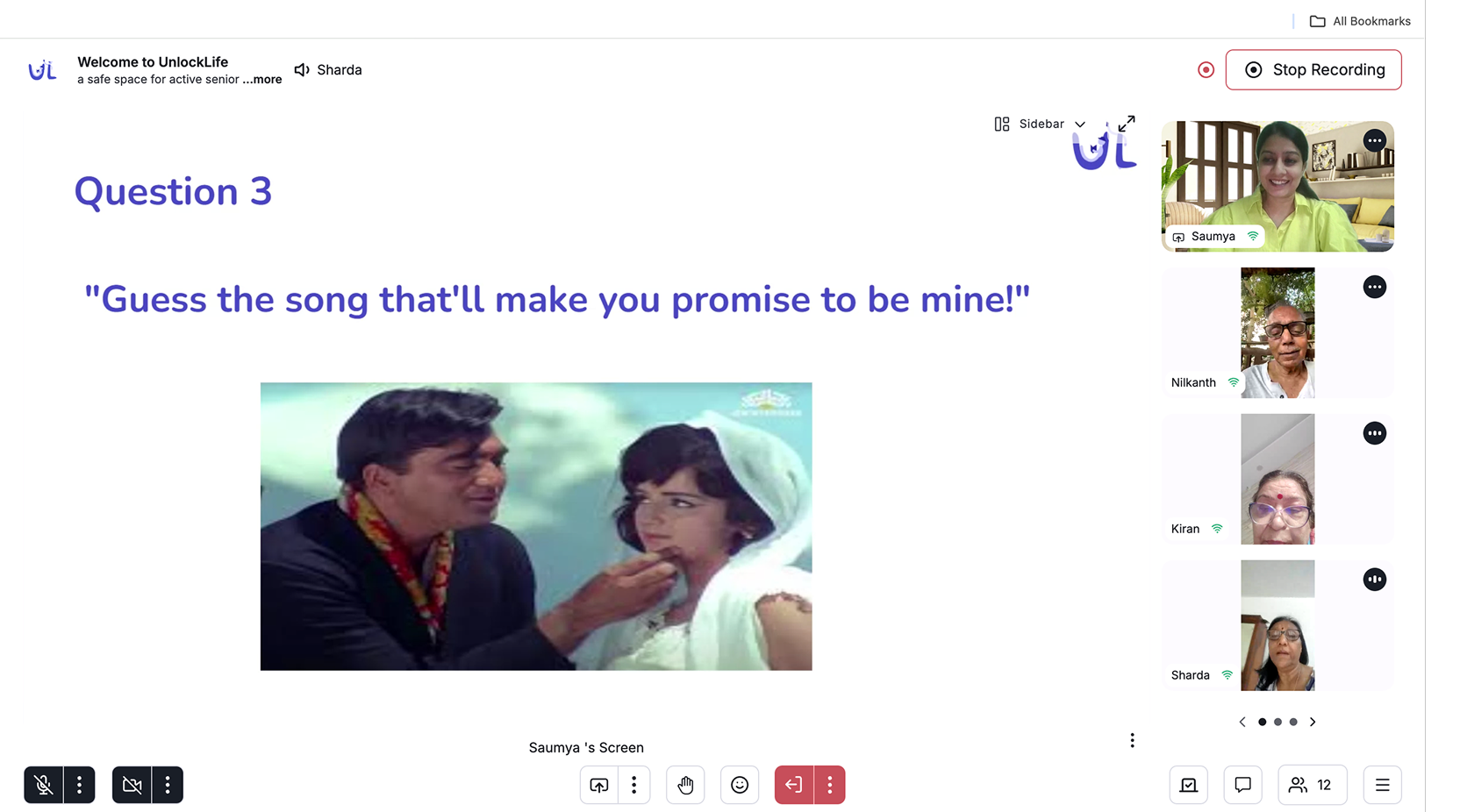
Current way of hosting quiz and managing winners
Research
I started by talking to the hosts and speakers
Conversations with hosts who had run earlier quiz and Tambola sessions surfaced the same friction over and over. Pinned to the wall, it looked like this
Questions dumped all at once
Seniors missed questions because everything appeared on screen together, with no pacing.
Host flying blind
No way to tell who had actually answered — hosts were guessing in the middle of a live call.
Winners tracked on Excel
No leaderboard, no reveal moment. Managing 50+ live participants on a spreadsheet was chaos.
Tambola late-join chaos
Late joiners kept asking which numbers were called. Everyone wanted the last 5 visible at a glance.
Ticket checks on WhatsApp
Since this was paid, winners had to send ticket photos on WhatsApp mid-event for validation.
100ms had its limits
No way to run two different games in one session, and no images or video to make quizzes visually fun.
We realized this wasn't just about “fun.” This needed a proper real-time event control system, focused on clarity, flow, and reliability.
Execution
Features we built
For the guests, the answer was clear — we'd embed the 100ms SDK directly inside the UnlockLife app, where seniors already register for events. One tap to join, no browser detour.
For the hosts and speakers, we worked with engineering to design a dedicated admin panel to run the show — calm on the outside, fully in control underneath.
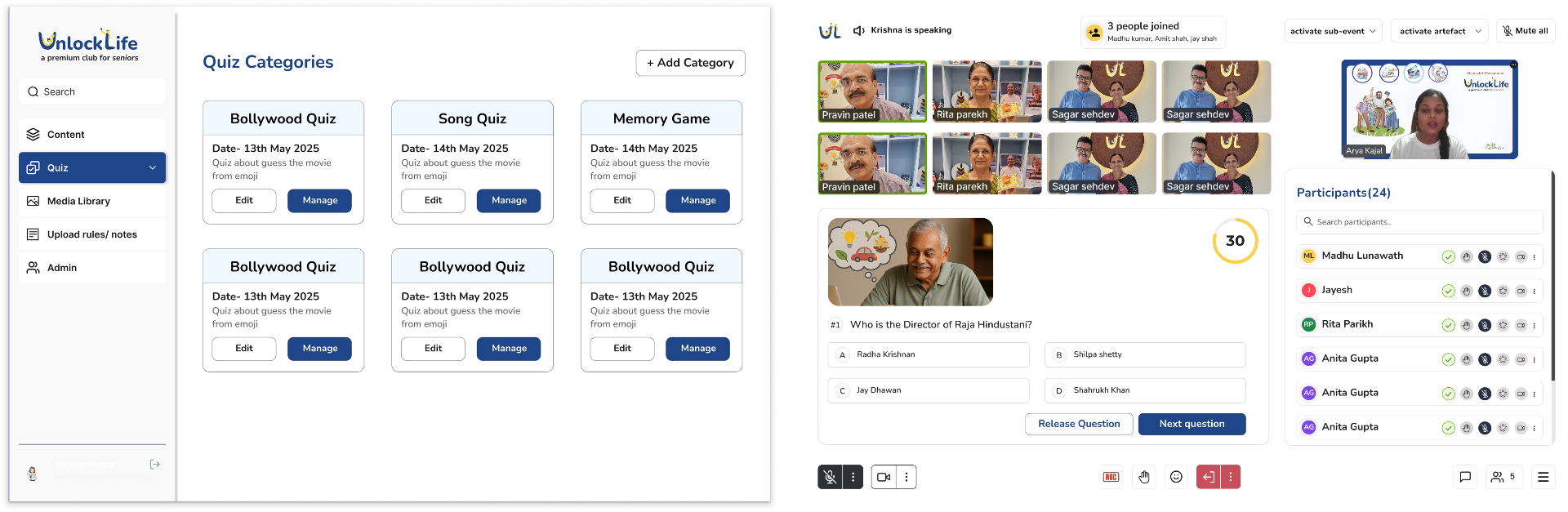
Sequential Question Release
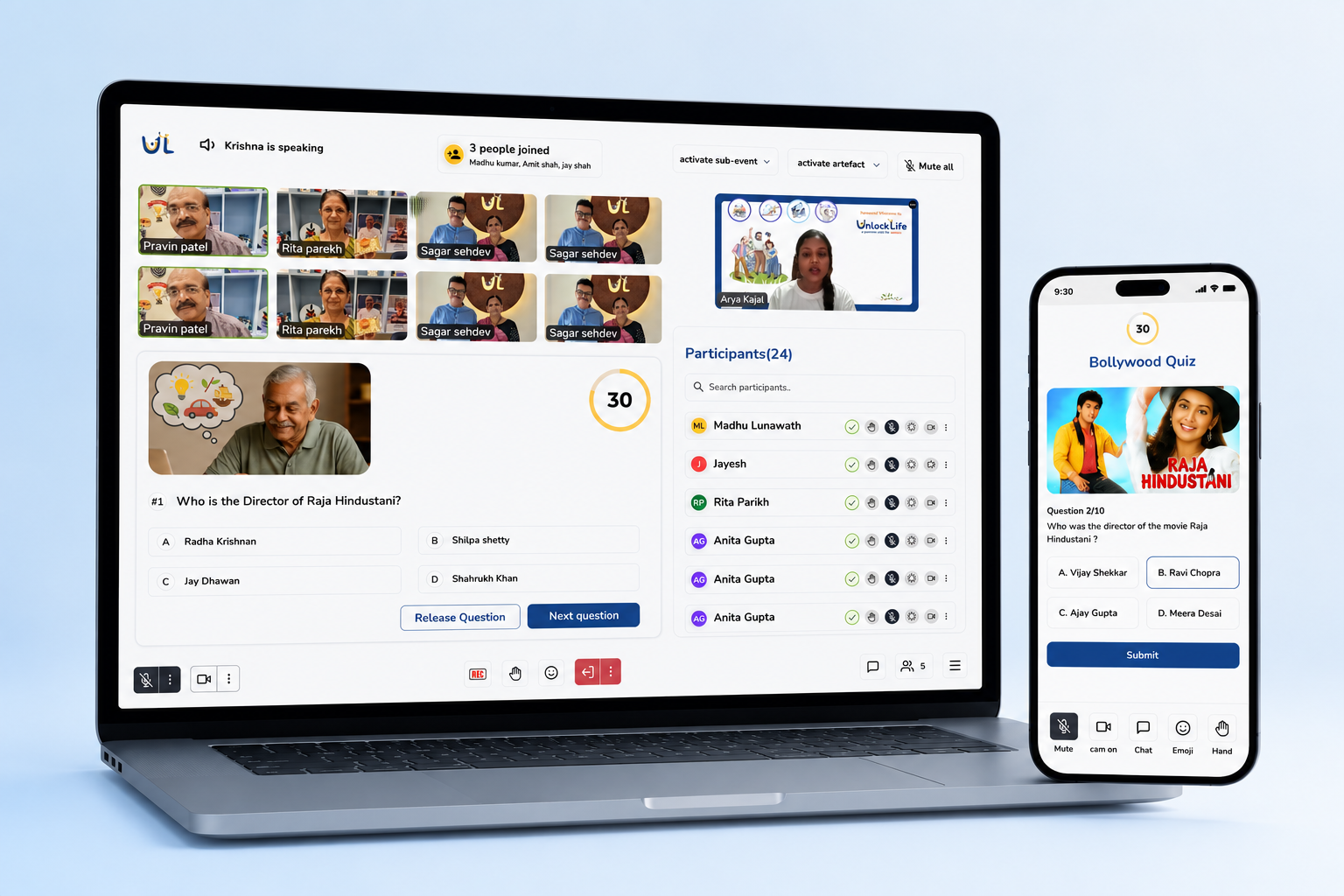
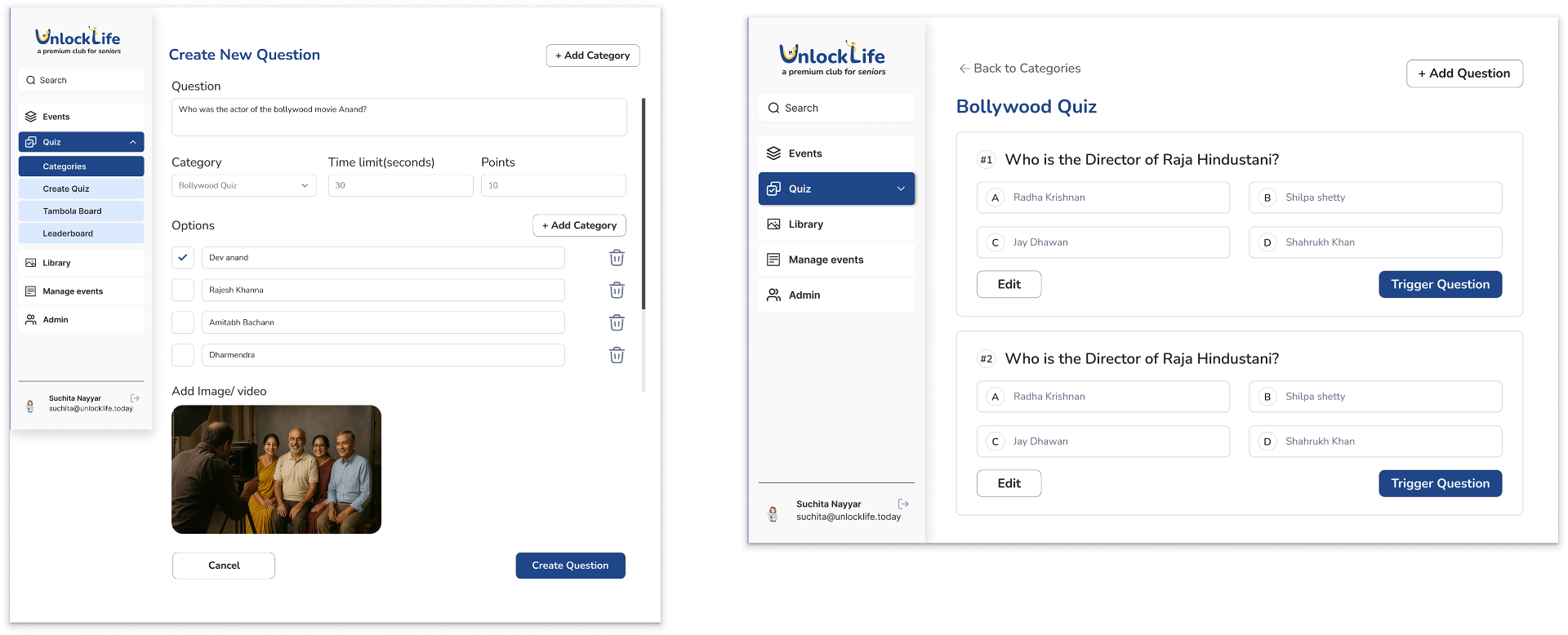
Instead of dumping every question at once, hosts now release them one by one from the admin panel. Each question appears individually on the participants' screens, and every response is tracked against the question that triggered it.
Pre-seeded questions, before the event starts
We removed the dependency on typing questions during the live call. Admins prepare entire quiz categories ahead of time — Bollywood, Songs, Memory — and on the day of the event, the host just triggers each pre-loaded question live. Spontaneity stays, the scramble doesn't.
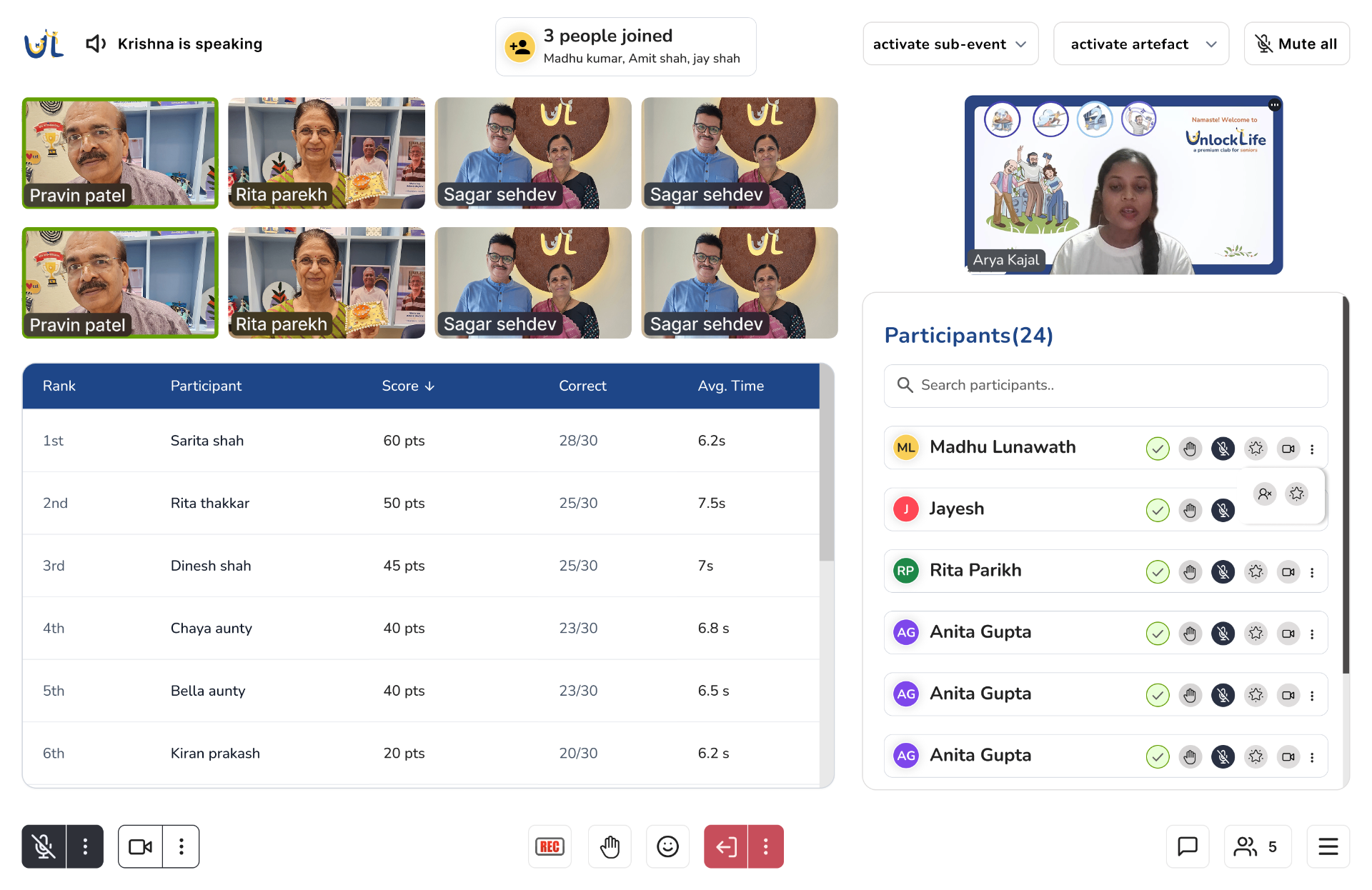
Real-time answer tracking
After every question, the host sees a live table of who has submitted, their running score, correct count and average response time. No more guessing — the quiz only moves forward once everyone has had a fair chance to answer.
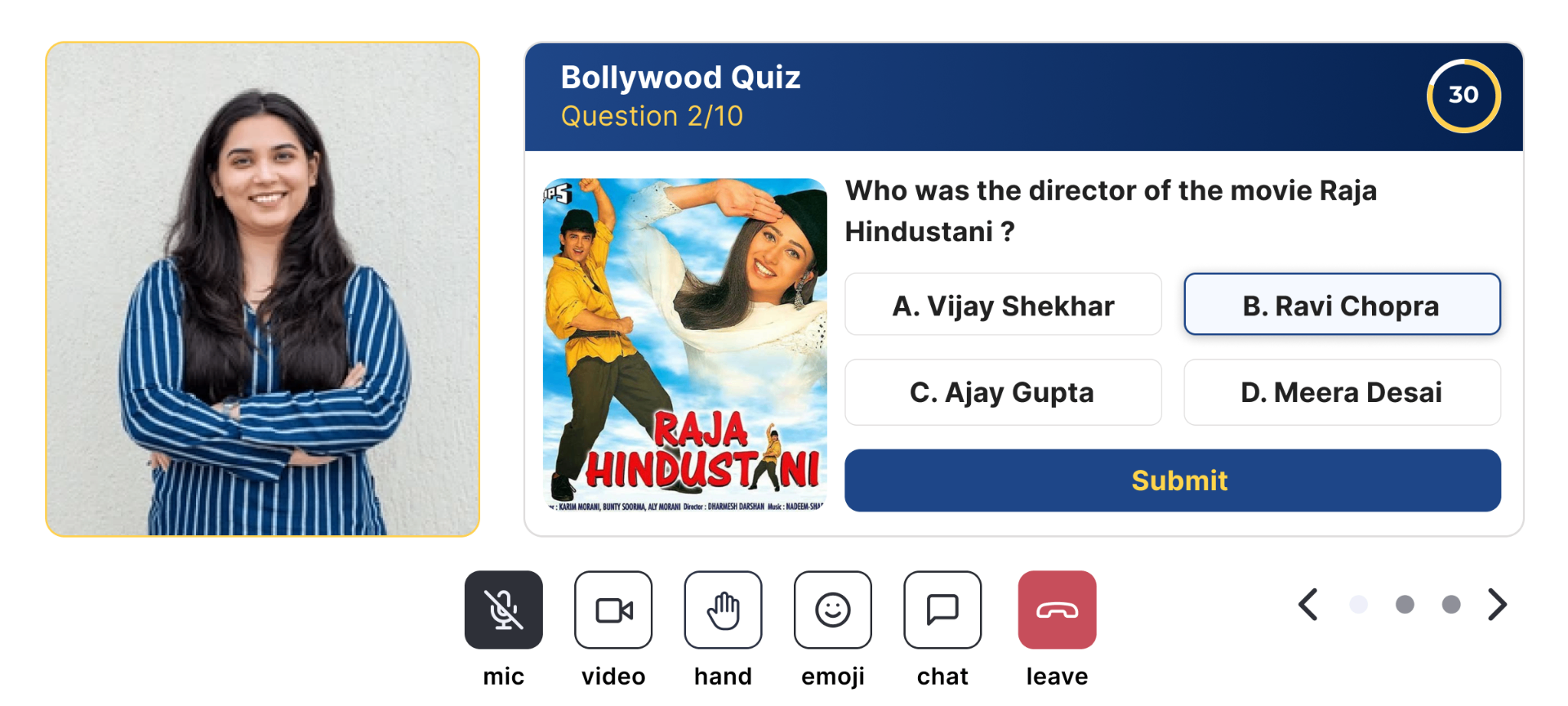
A clear, tappable question view — right inside the call
Earlier, the host had to screen-share every question and 100ms's default quiz UI didn't even support images — so movie posters, album covers and visual clues were lost in a blurry shared screen. We built a dedicated question card that sits next to the host's video tile: bold question text, a crisp image, four tappable options, and a visible countdown ring. Participants now read, see and submit in one tap — no squinting, no guessing how much time is left.
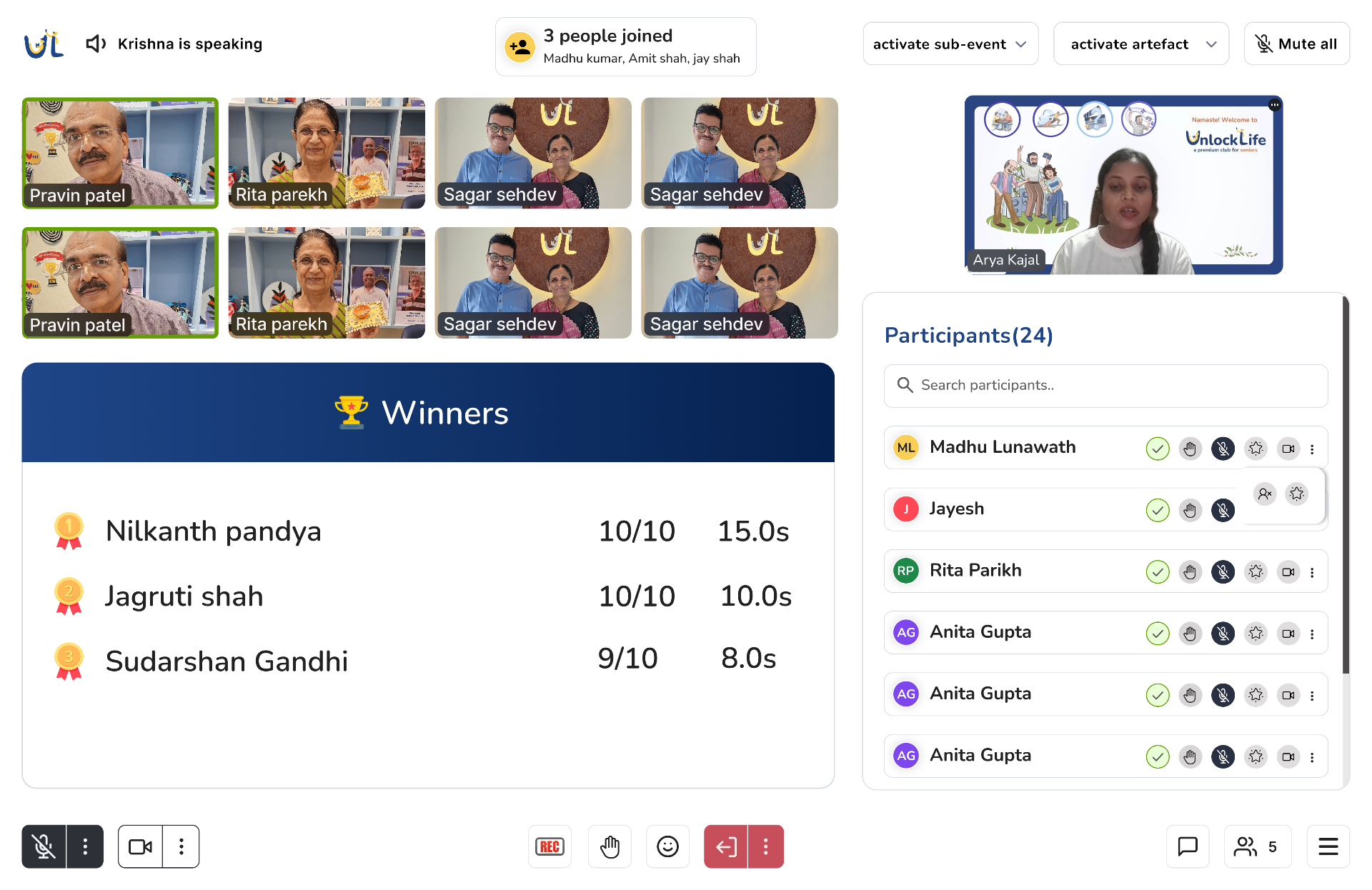
Built-in leaderboard & winner moment
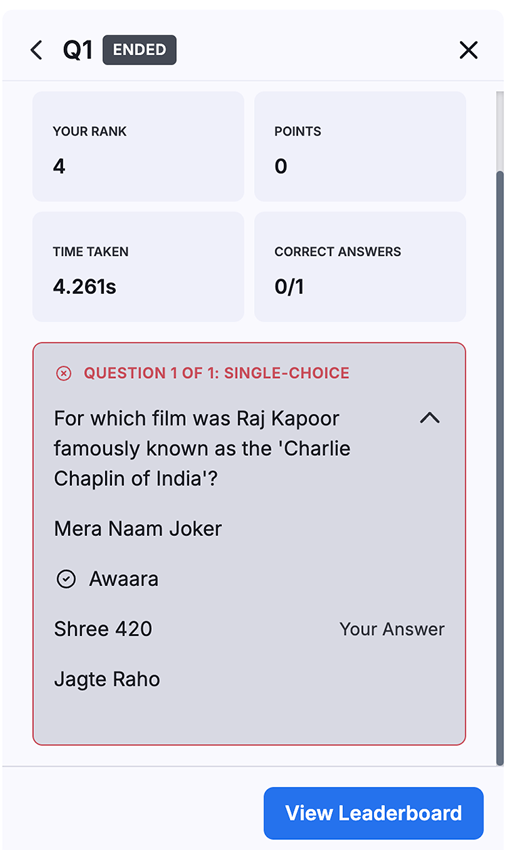
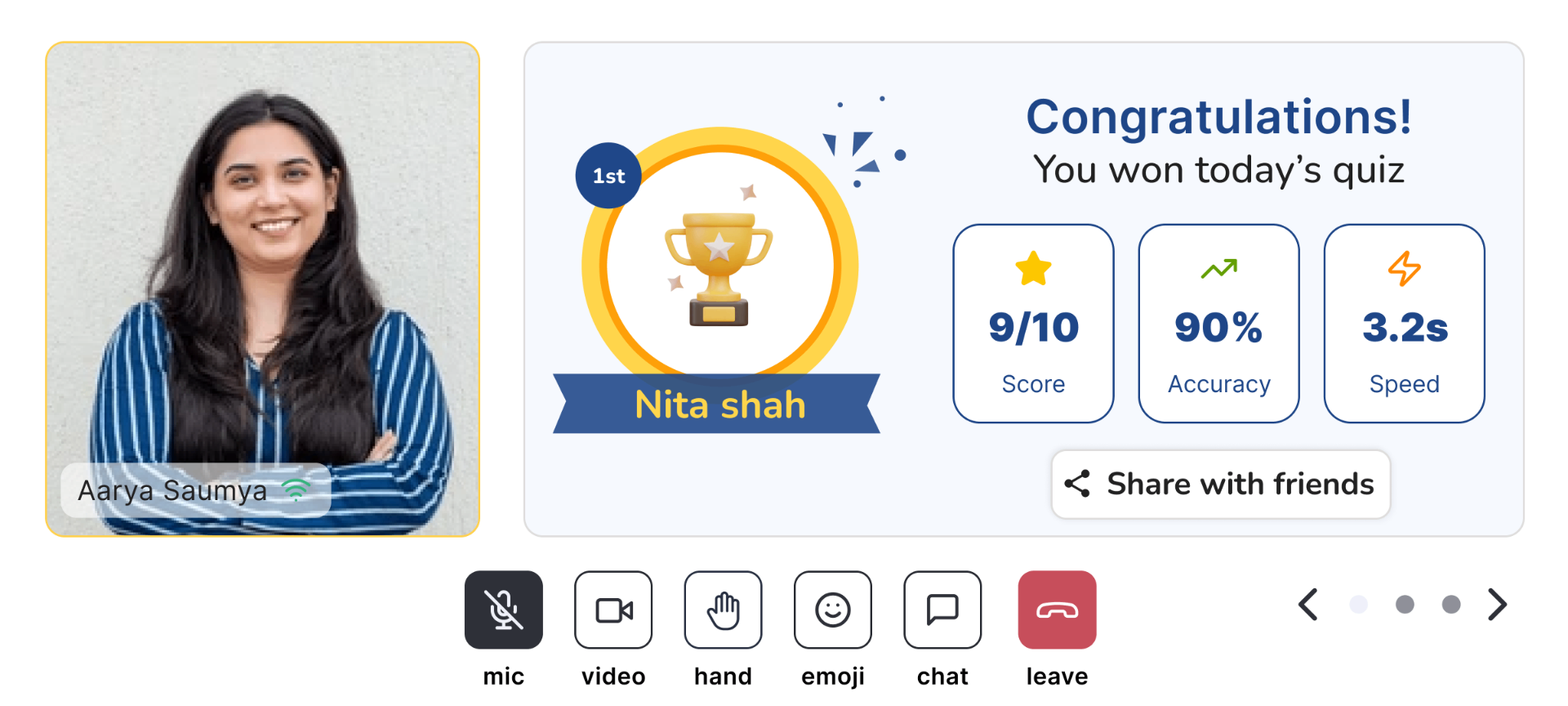
When the quiz wraps, a clean leaderboard auto-reveals the top scorers — ranked by accuracy and speed — and every participant gets a personal result card on their screen. No more Excel sheets, no more manual tallying. The host can preview results privately or push them live to everyone.
A digital Tambola board, synced with every player's ticket
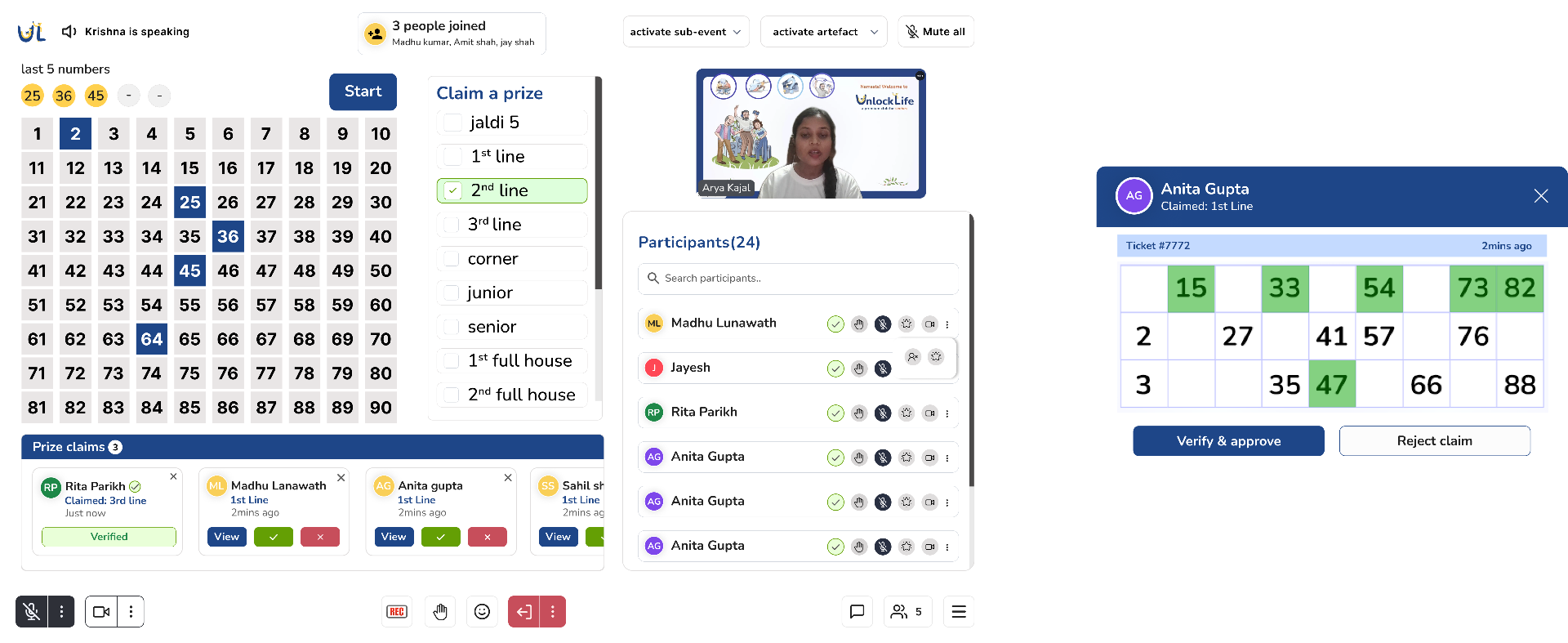
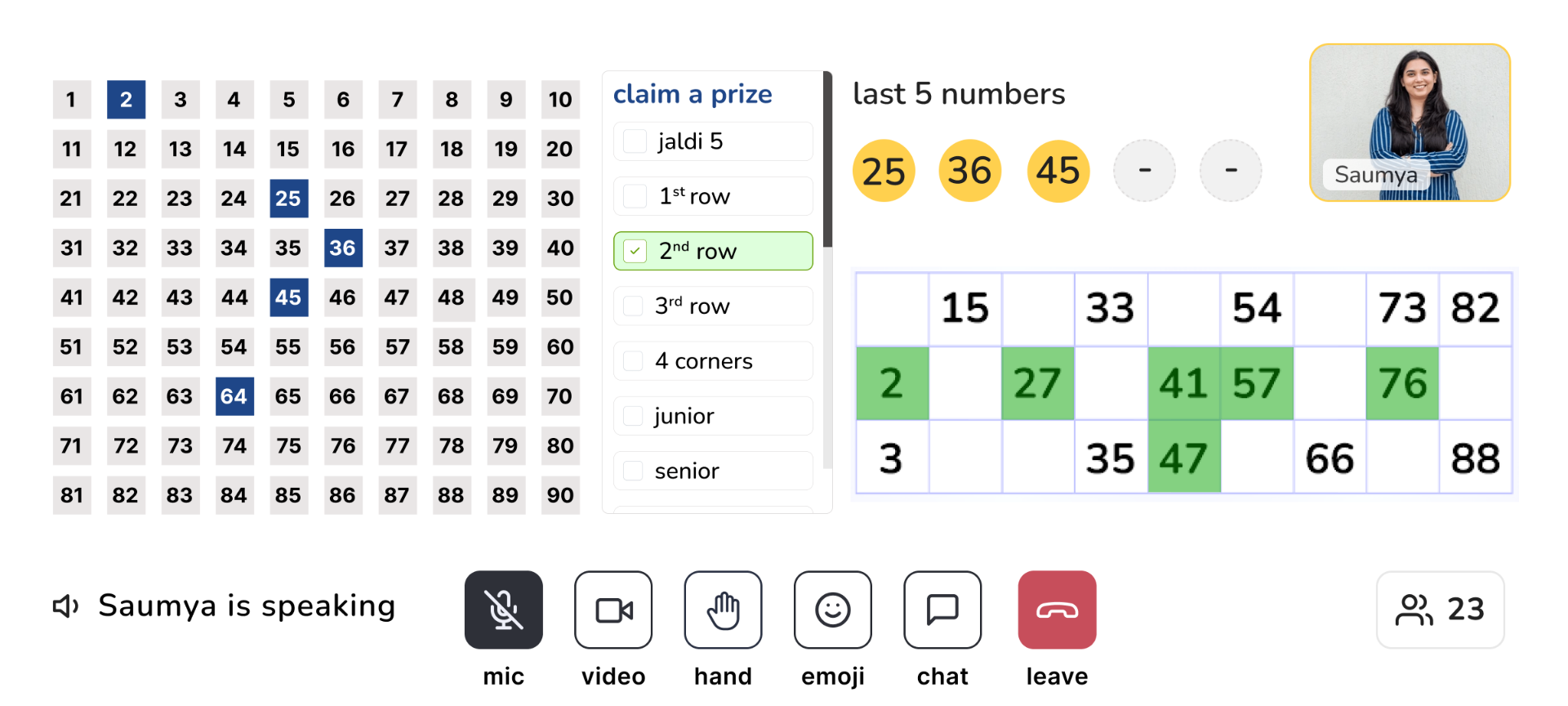
Before this, players drew their tickets in a notebook and WhatsApp'd a screenshot to the host every time they claimed a prize — chaotic with 50+ participants and impossible to verify quickly. We built a full Tambola flow inside the call: the host runs the board, players see their own ticket on their phone, and claims are verified in one tap.
- •Live 1–90 board with the last 5 numbers always visible for late joiners.
- •Every player gets their own digital ticket — tap a number as it's called, no notebook, no screenshots.
- •All prize types built in — Jaldi 5, lines, corners, junior, senior, full house.
- •Host-side claim verification — the claimed ticket opens with marked numbers highlighted; verify or reject in one click.
- •Real-time sync — every tap, call and claim stays in lockstep across host and participants.
impact —
From a 3-person scramble to a one-host show.
The new admin + live-event system changed how UnlockLife runs online events — fewer people behind the scenes, more people actually showing up, and zero WhatsApp screenshots for ticket verification.
3 → 1
Team members per session
What earlier needed three people coordinating in the background can now be run end-to-end by a single host.
2×
Live event attendance
With a smoother, more reliable experience, twice as many members started joining the live sessions every week.
~90%
Faster Tambola verification
Claim → verify → approve now takes one tap, instead of waiting for a WhatsApp screenshot and matching numbers by eye.
0
Manual leaderboards
No more Excel sheets after a quiz — winners are revealed automatically with scores, accuracy and speed.
50+
Concurrent players, comfortably
The system now holds steady with 50+ seniors live in one room — without dropped claims or out-of-sync boards.
1 tap
To answer or mark a number
Non-intimidating, senior-friendly interfaces — large targets, clear timers, and nothing that needs explaining mid-event.
and that's a wrap →